● Remotely by aanicod

Control any computer,
from anywhere.

Remotely is a fast, secure remote-desktop tool. Share a 9-digit ID, connect in seconds, and work on a remote machine as if you were sitting in front of it.

15-day free trial · No credit card to start · Windows & macOS
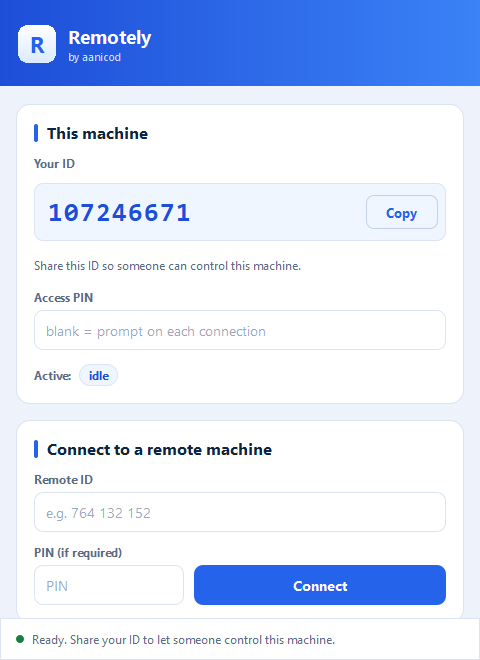
The Remotely desktop app — your ID, access PIN, and a field to connect to a remote machine
~70 fps GPU video P2P direct connect H.264 / H.265 hardware encode System audio streaming Cross-platform Windows & macOS
How it works

Connect in three steps

1
⬇️

Install & sign in

Download Remotely, create your account (or sign in with Google), and it's ready.

2
🆔

Share your ID

Each machine shows a 9-digit ID. Give it to whoever needs access — set a PIN for unattended use.

3
🖱️

Connect & control

Type the remote ID, approve the session, and you're in — screen, sound, clipboard and files, all live.

Features

Everything you need for real remote work

Built for speed and clarity — hardware-accelerated video, a direct peer-to-peer path, and the little things that make remote control feel local.

🎬

GPU-accelerated video

Encoded on the host GPU for crisp, bandwidth-light streaming — no CPU melt, no blurry frames.

~70 fps H.264 / H.265
NVIDIA NVENCAMD AMFIntel QSV
⚡

Low-latency control

Mouse and keyboard travel a direct path with Nagle disabled, so input feels instant — not a laggy round-trip.

🔗

True peer-to-peer

ICE/STUN/TURN finds a direct route between networks, with a relay fallback that never drops your session.

🔊

System audio

Hear the remote machine — its sound is streamed to you with low-latency Opus audio.

📋

Clipboard & files

Copy here, paste there — or drag a file onto the remote screen to send it straight across.

🔐

Secure sign-in

Real accounts with email verification, plus a per-session PIN or an Accept prompt before anyone sees your screen.

PasswordGoogleEmail OTPSession PIN
🔄

Automatic updates

The app keeps itself current — new versions install silently so you're always on the latest build.

🖥️

Cross-platform

Every install is both a host and a viewer — control, or be controlled, on either OS.

WindowsmacOS
🏷️

Stable device IDs

Each machine keeps the same 9-digit ID across restarts, so saved connections just keep working.

Pricing

Start free. Upgrade when you're ready.

Try everything for 15 days. When your trial ends, keep going with a subscription — no features held back during the trial.

Monthly
₹300 / month
  • ✓Full access to every feature
  • ✓GPU video, P2P, audio, file transfer
  • ✓Unlimited connections
Download

Get Remotely

Install in seconds — no admin rights needed. It updates itself automatically.

✓ Windows 10 & 11 ✓ macOS 13+ (Apple Silicon) ✓ Per-user install (no admin) ✓ Auto-updates ✓ v2.45

macOS: open the .dmg and drag Remotely to Applications. Until the build is notarized, right-click the app and choose Open the first time, then grant Screen Recording and Accessibility when asked.